Instagram QR code: how to create it, use it and where to point it
Instagram makes a QR code for your profile, and your link-in-bio page has another one. See the difference, the steps for each, the right print size and which one to use on a shop window, a badge or packaging.
Published · 7 min read · by Kasbu Team
Tags: QR code, Instagram, Link in bio
When people talk about QR codes and Instagram, there are two different codes. One takes people to your profile inside the app. The other takes them to your link page, with WhatsApp, your catalog and your address. Many people print the first one expecting what the second one does, and conclude that "QR codes don't work".
The choice comes down to one question: do you want people to follow you, or to get in touch with you?
The two QR codes
The profile QR is made by Instagram itself. Whoever scans it lands on your profile, inside the app, with the Follow button right there. It's for gaining followers.
The QR of your link page points to an address like kasbu.bio/yourname. It opens in the browser, and there people can message you on WhatsApp, browse your catalog, open the map or book an appointment. It's for getting contacts and sales.
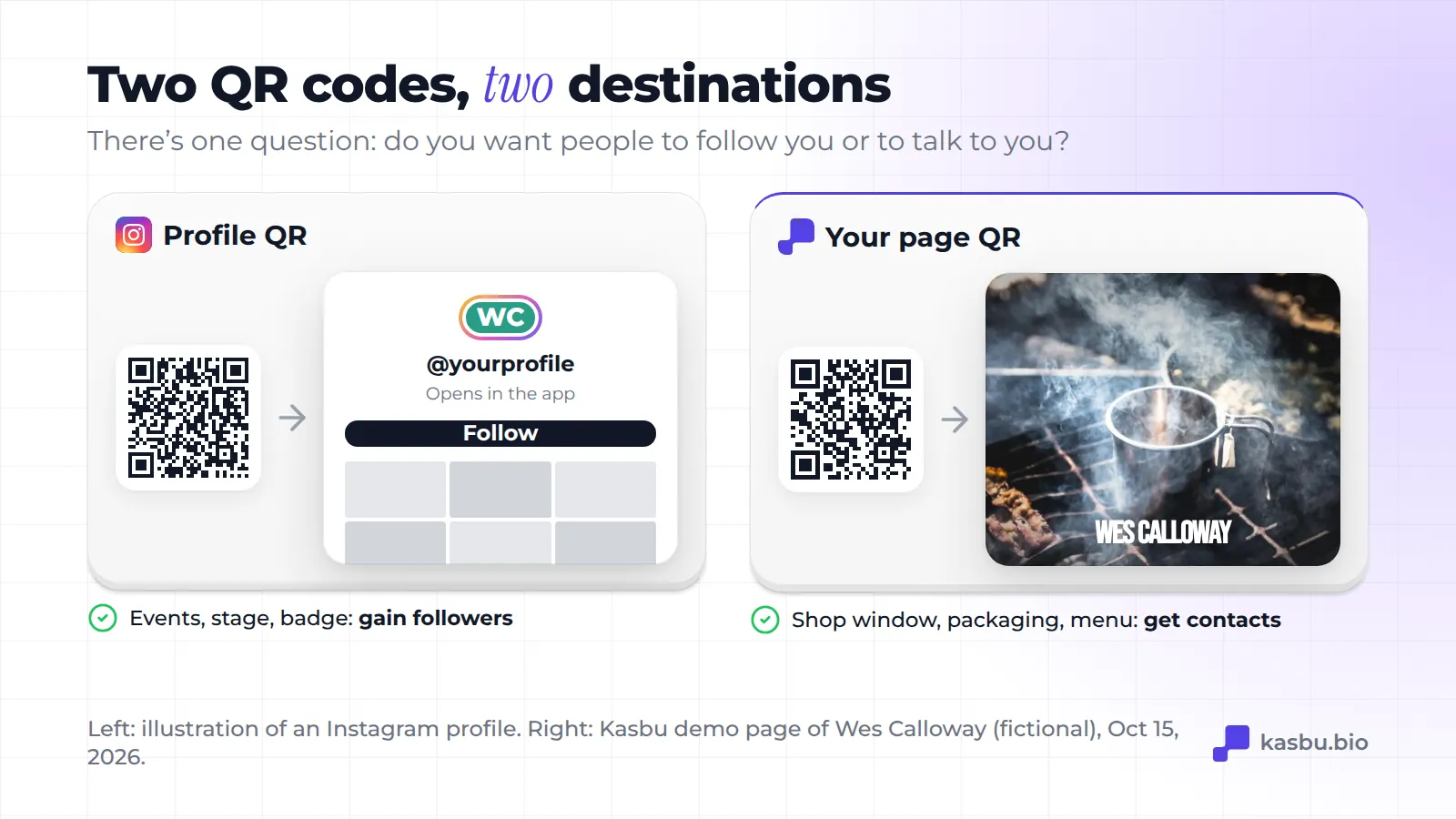
A concrete example: a T-shirt shop in Recife, Brazil. At a stand at a trade fair, where the goal is to be remembered later, the profile QR makes sense. On the shop window, someone walking past at 9 p.m. with the door closed wants to know the opening hours and send a message, and the Instagram profile doesn't answer that in one tap. There, the page QR works better.
How to get your Instagram profile QR code
Right in the app, with no outside tool:
- Open your profile.
- Tap the menu (the three lines in the top right corner).
- Tap QR code.
- Tap the background to change the style: there are solid colors, gradients and emoji patterns.
- Download the image as a PNG or use Share to send it to someone.
To read someone else's QR, use the scan option on the same screen or point your phone's regular camera at it, which reads it too.
This path is the one described in Rocketlink's guide from August 2026. Instagram changes its menus often, so if your app looks different, look for "QR code" in your profile menu. The same guide says the code doesn't expire, because it's tied to the account. If you change your @, scan the code again before sending it to print: it's a ten-second test that saves you a whole wasted print run.
How to get the QR for your link page
First you need the page. On Kasbu it lives at kasbu.bio/yourname, and the QR code is on the free plan.
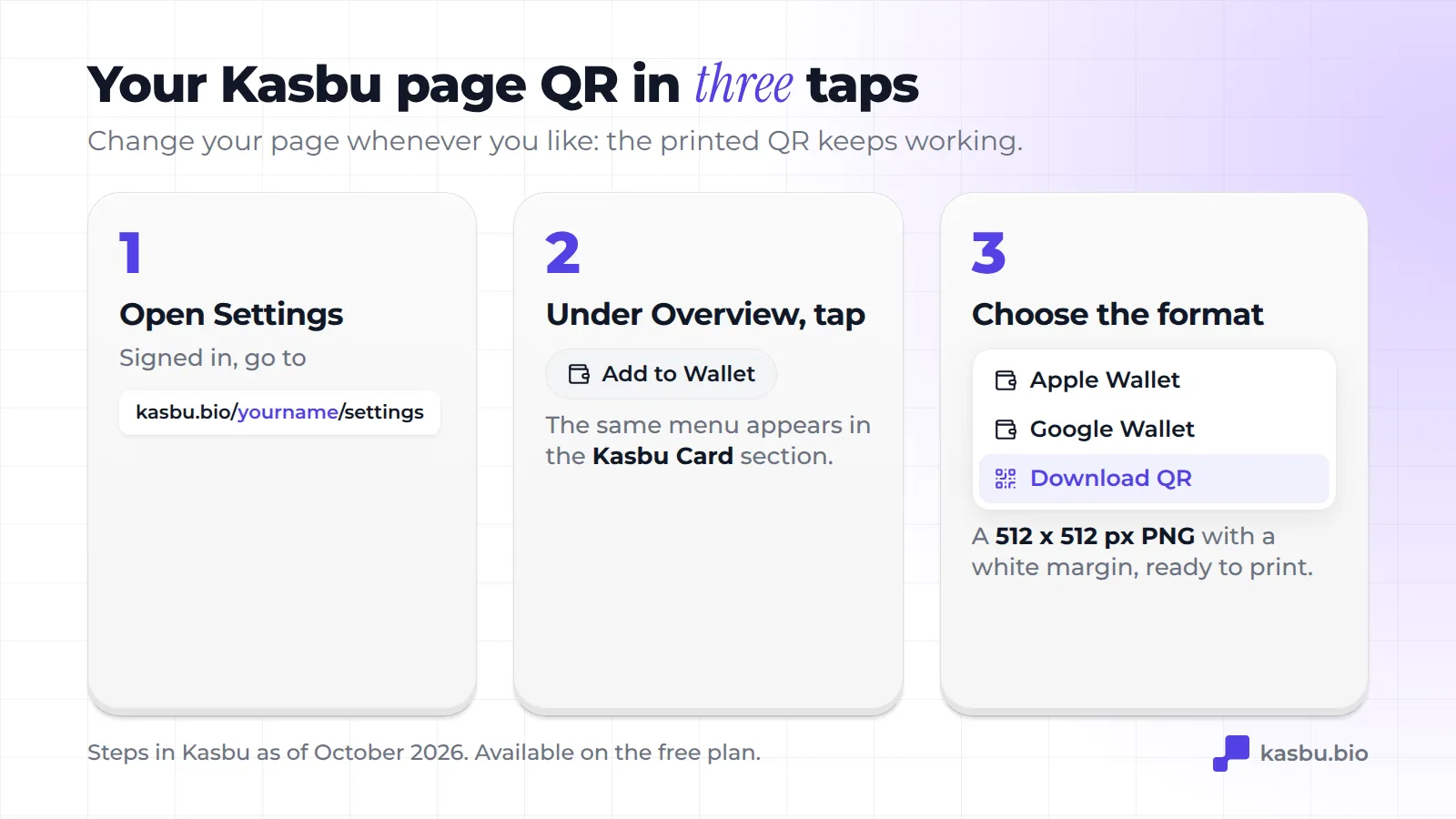
- With your account open, go to Settings (
kasbu.bio/yourname/settings). - In Overview, tap Add to Wallet. The same buttons appear in the Kasbu Card section.
- Choose Download QR. The file comes out as
yourname-qr.png, at 512 x 512 px with a white margin around it.
The same menu has Apple Wallet and Google Wallet, which save a pass with that QR to your phone's wallet. It's the fastest way to show the code in a conversation without hunting for the image in your gallery.
Two technical details that help with printing:
- The code uses error correction level H, the highest in the QR standard. It stays readable even with about 30% of its area damaged, a scratched sticker or a fold in the paper.
- On a computer, when you open the mobile preview of your page, the same QR appears next to it, with the caption "Scan and view". Use it to check on your phone how the page looks before you print anything.
The big advantage of this code is that the address is fixed and the content changes whenever you want. Printed a thousand stickers and then changed your WhatsApp number? You edit the card on your page, and every sticker already printed now leads to the new number. A QR that points straight to wa.me/55... is stuck with the number you used when you made it.
The one thing to watch: the QR leads to kasbu.bio/yourname. If you change your username later, the address changes and the printed code no longer opens your page. Settle on the name before you print.
Where to put the QR code
On the shop window or door. For shops, it's the most direct use. Add a line that says what people will find ("opening hours, catalog and WhatsApp"). A code alone on a wall isn't very convincing.
On the menu or the table. Restaurants already use it for the digital menu. The same page can hold the booking link and the Wi-Fi: Kasbu has a WiFi card that shows the network name and password.
On packaging. A sticker inside the package takes people who already bought from you to the rest of your catalog or to your Instagram.
On your badge at events. It handles swapping contacts in two seconds. If the idea is to gain a follower, use the profile QR. If it's to gain a customer, use the page one. The full walkthrough is in the guide to the virtual business card.
In videos and presentations. A QR on the last slide or in a Reel lets people scan with their phone while they watch on another screen.
On the paper card you already have. No need to throw it away: a sticker with the QR on the back updates what's already printed.
Size and tips so the QR doesn't fail
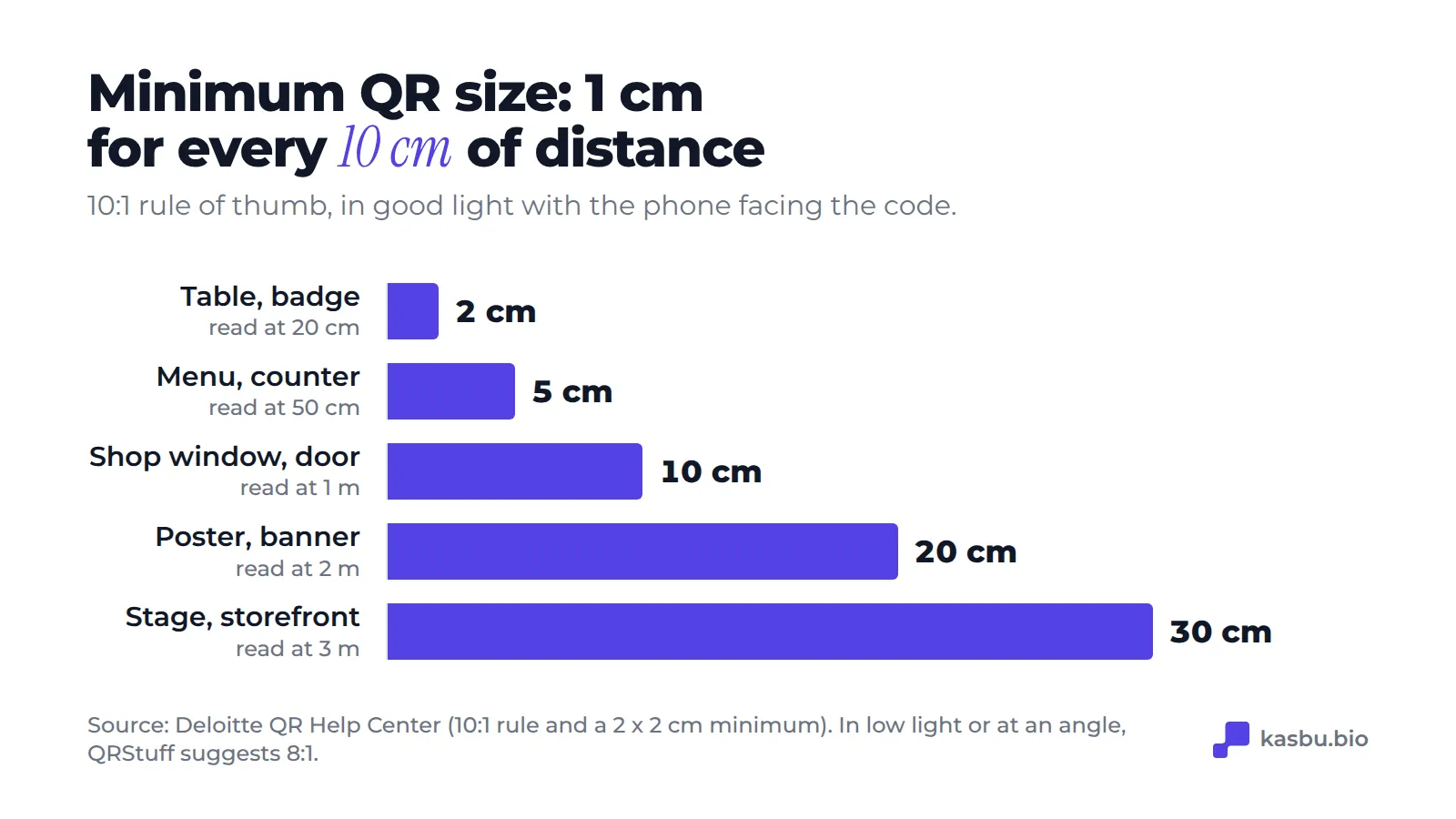
Size. The most quoted rule of thumb is 10:1: the scanning distance divided by ten gives the minimum side of the code. Deloitte also recommends an absolute minimum of 2 x 2 cm. For a shop window read from the sidewalk, at 1 meter, that's 10 cm per side. In low light or when scanned at an angle, QRStuff suggests 8:1, which means a slightly bigger code.
Contrast. A dark code on a light background always works. The reverse doesn't always. A photo behind the code is the riskiest case.
Margin. A QR needs a light border around it. Kasbu's PNG already comes with one: don't crop it.
Paper. Very glossy paper reflects the shop lights and confuses the camera. Matte reads better.
Test before printing a thousand. Scan with two or three different phones, iPhone and Android, at the real distance people will read it from.
What to measure afterwards
A printed QR looks like a one-way street, but you can tell whether it's working. If the code points to your page, your page visits are your number.
On Kasbu, the free plan shows total visits for any period and full detail for today. Pro opens up the detail for other periods, day by day, with devices, countries and cities.
A simple comparison: stuck the QR on the shop window on a Monday? Compare the visits in the following week with the week before. If nothing changed, the problem is usually the position (too high, hidden behind a poster) or the lack of a reason to scan.
Frequently asked questions
Does the Instagram QR expire? According to Rocketlink's guide (August 2026), no: it's tied to the account. If you change your @, test it before reprinting.
Can I customize the colors? In the Instagram app you can change the background to colors, gradients or emoji. Outside generators give you more freedom, but the more you change the code itself, the higher the risk that scanning fails. Always test.
Do I need an app to scan? No. The built-in camera on iPhone and on most Android phones reads QR codes. Just point it.
Is the Kasbu QR paid? No. QR code, Apple Wallet and Google Wallet are on the free plan, along with 25 cards per profile.
Which of the two codes should I print? Followers: the profile one. Contact, sales or bookings: the page one. If there's only room for one, use the page one, because you can put an Instagram card inside the page. The reverse doesn't work: from your profile, people only reach your link if they look for it.
Sources
Checked on October 14, 2026.
- Instagram QR steps: Rocketlink, "Instagram QR Code: Find, Create, and Scan It", Aug 9, 2026: https://rocketlink.io/blog/instagram-qr-code
- 10:1 rule and 2 x 2 cm minimum: Deloitte QR Help Center, "What is the minimum size of a QR Code?": https://qr.deloitte.com/help/en/article/what-is-the-minimum-size-of-a-qr-code
- Adjusting to 8:1 in low light or at an angle: QRStuff, "What Size Should A Printed QR Code Be?": https://www.qrstuff.com/blog/?p=69
- Kasbu data (PNG format and size, error correction level, Wallet, free plan limits): the product itself, in October 2026.
Don't have a page for the QR to point to yet? Create yours for free and download the QR right after. If you want ideas first, see how other people built theirs or read what Kasbu is.