Virtual Business Card: How to Make Yours for Free in 2026
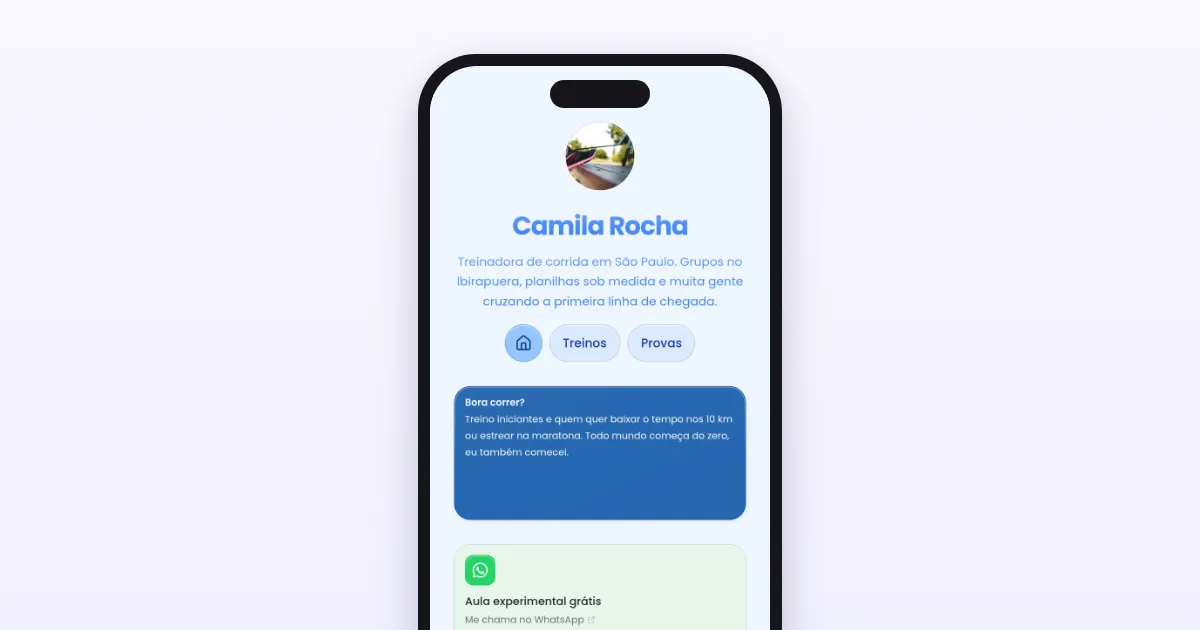
A virtual business card is a page with your contact details, links and socials that you share by QR code, link or your phone's wallet. See what paper cards cost, what to put on a virtual one and how to make yours for free, step by step.
Published · 8 min read · by Kasbu Team
Tags: Digital Business Card, Link in Bio, Tutorial
A paper business card has one simple problem: by the time someone wants to find you again, it has already sunk to the bottom of a drawer. A virtual business card swaps the paper for a page of your own, with your contact details, links and socials, that opens on the phone of anyone who scans a QR code.
This guide covers what it is, what a paper card costs by comparison, what to put on a virtual one and how to make yours for free.
What is a virtual business card?
It is a web page that works as your calling card. Instead of printing your name, phone number and email on a small rectangle of paper, you gather everything at a single address, like kasbu.bio/annasmith, and share it by link, by QR code or from your phone's wallet.
The practical differences from paper:
- Update it whenever you want. New phone number or new job? You edit the page, and everyone who already has the link keeps seeing the right version.
- It holds much more. Besides your contact details, there is room for a portfolio, WhatsApp, a catalog, a booking calendar, a playlist, whatever makes sense for you.
- You can see whether it worked. Analytics show how many people opened the page, something a printed card can never tell you.
- It never runs out. There is no "I'm out of cards" the night before an event.
What a paper card costs
For reference: at Printi, an online print shop in Brazil, 1,000 cards of 9 × 4.8 cm on 300 g matte coated paper, printed on both sides with no special finish, cost R$97.41 (Brazilian reais). A hundred cost R$40.54. Prices were checked on Printi's website on 14 October 2026, shipping not included.
That is not expensive. The bigger cost shows up when something changes: a new phone number, a new address or a new Instagram handle means another print run. A virtual page takes a minute to edit, and the printed QR keeps leading to the right place.
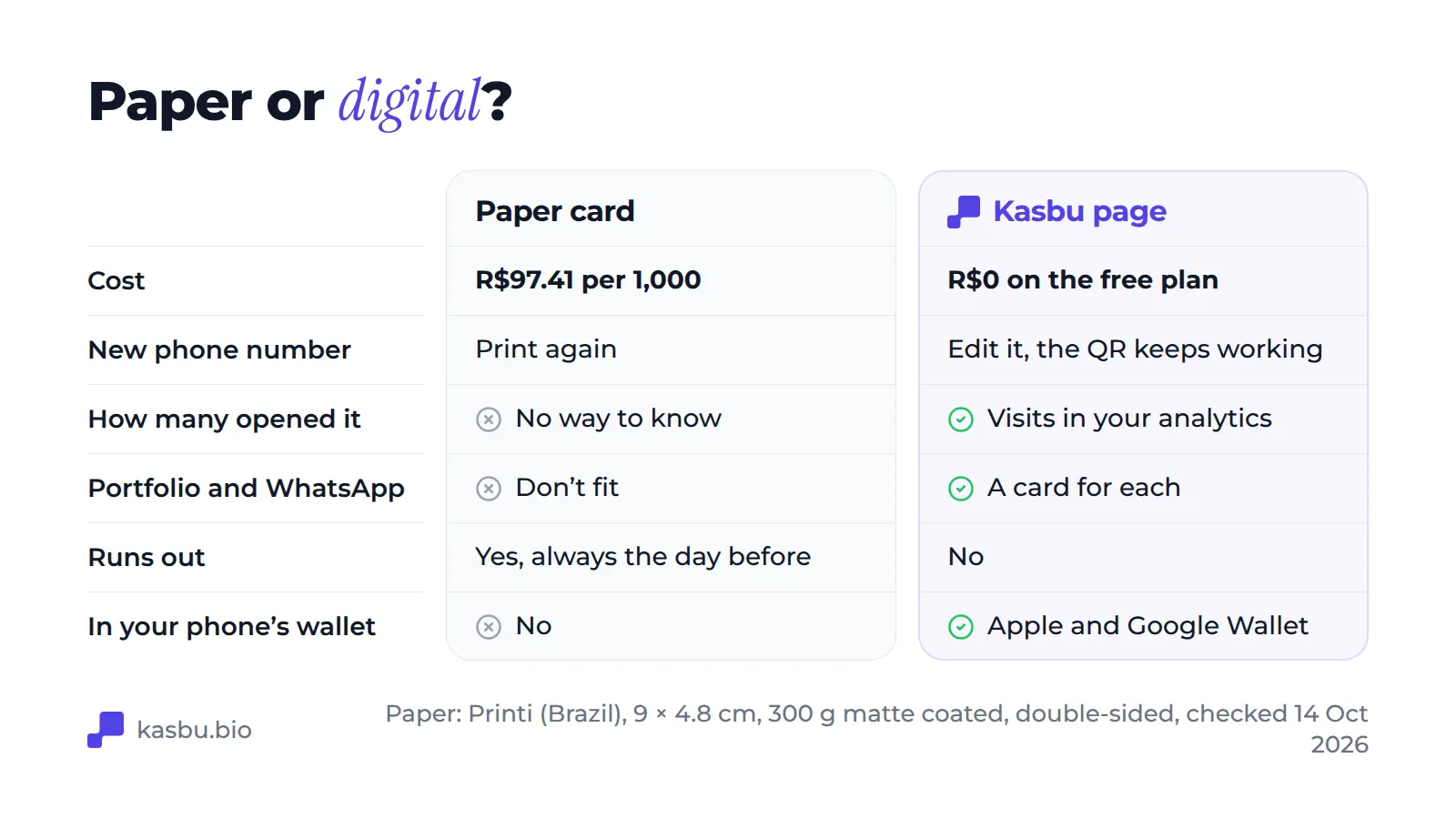
The two work well together. Plenty of people keep their paper card and print their virtual page's QR code on it.
Virtual card, digital card or link in bio: are they the same thing?
In practice, yes. The three names describe the same idea for different audiences.
Digital business card tends to be the term used by people thinking about business: freelancers, real estate agents, hairdressers, consultants. The focus is contact and credibility.
Link in bio is what content creators call the same page, because it was born to get around the single link Instagram allows in a profile. The focus is sending the audience to several destinations.
Virtual business card sits in between: people searching for this term usually want to replace paper, not organize social media links.
The page is the same. What changes is what you put front and center.
What you can't leave out
Pages that work as a business card have four things in common.
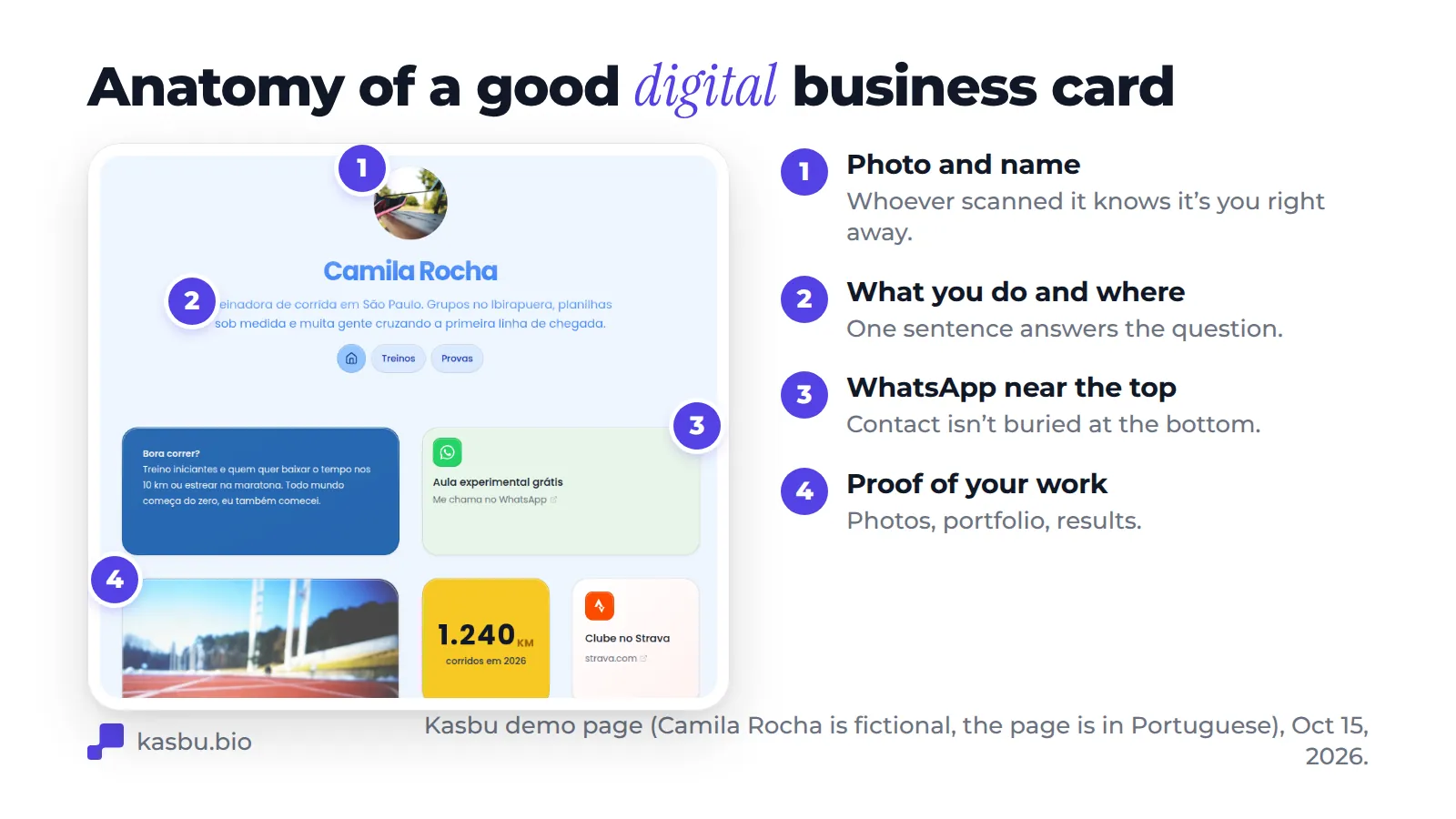
1. A photo and a name people recognize. Whoever scanned your QR has just met you. If the page opens on a generic logo, they won't connect your face with the contact.
2. A line that says what you do and where. "Coach" is not enough. "Running coach in São Paulo" already answers the question on the visitor's mind.
3. An obvious way to reach you. In Brazil, where this example comes from, that almost always means WhatsApp. Wherever you are, use the channel your clients actually reply on, and put that card at the top, not at the bottom of the page.
4. Proof of your work. Photos, a catalog, testimonials, links to projects. That is what separates a business card from a contact list.
The most common mistake is the opposite: stuffing the page with every link you have. If everything carries the same weight, nothing stands out. Pick the one action you want people to take and give it pride of place. The median Kasbu page has about 4 cards.
How to make yours on Kasbu, step by step
The steps below use Kasbu, which has a free plan and doesn't ask for a credit card. The same logic works for any similar tool.
1. Create your account and choose your address
Sign up at kasbu.bio/register and choose a username. It becomes your page address, so go with your real name or your brand's: kasbu.bio/annasmith works better on a printed card than anything with numbers in the middle.
If you already have a page on Linktree, own.page or Avely, keep it open in another tab: in step 3 you paste the same links into Kasbu's cards.
2. Set up your header
Photo, name and the line that explains what you do. Give that line the thirty seconds it deserves: it is the part most people read.
3. Add the cards that matter
On Kasbu, every block is a card you can drag and resize. For a business card, the most useful ones are:
- WhatsApp: opens a chat straight away, without the person having to save your number.
- Link: for your website, portfolio, shop or booking page.
- Image: photos of your work. With more than one photo, the card becomes a carousel.
- Location: a map, if you work from a fixed address.
- Email and Phone: for people who prefer the traditional way.
- File: a menu, price list or portfolio as a PDF.
The free plan gives you 25 cards per profile, and all 36 card types are unlocked. Start with four or five and add more later.
4. Make it look like you
In the Design menu you choose colors, a background photo or effect, the font (there are 14) and the card material. Since 13 October 2026, all of it is free. If you already have a visual identity, use your own colors: the card is an extension of it.
5. Get your QR code and wallet pass
Under Settings you'll find the two buttons that take your card into the physical world:
- Download QR: the QR points to your page and can go anywhere. On the back of your paper card, in your shop window, on your name badge, on a sticker on your motorbike, on the last slide of a presentation. For the minimum print size, see our guide to QR codes for Instagram.
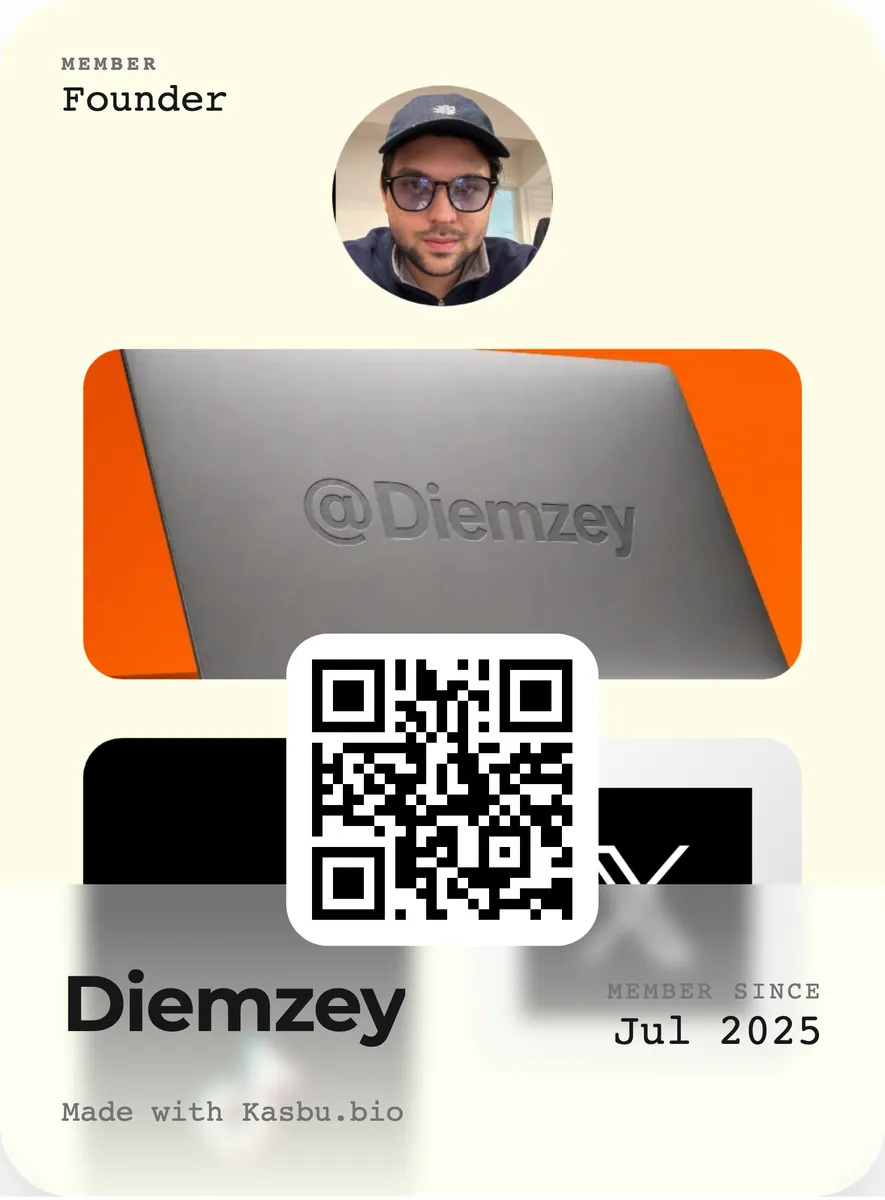
- Add to Wallet: puts a pass with your photo, your name and the QR into Apple Wallet or Google Wallet. It sits next to your boarding passes and tickets, two taps away whenever someone asks for your contact details.
How to share it at the right moment
Having the page is half the job. The other half is making sure it shows up when someone wants to find you.
In person. Showing a QR is faster than reading out your phone number. At a trade show or event, open the wallet pass or stick the QR on your badge.
On Instagram. Put the address in the link field of your bio. That is where the term "link in bio" was born, and it is still the main way in for many people.
On WhatsApp. Use the page in your WhatsApp Business greeting message. It answers "send me your contact details" with a single link.
By email. One line in your signature, under your name.
What a virtual card costs
On Kasbu, the free plan includes the page, 25 cards per profile, up to 3 pages, 2 profiles, every card type, the entire Design menu, the QR code and the wallet pass. Free analytics show your total visits and the breakdown for the day.
A free page shows a "Follow on Kasbu" button to visitors without an account. Kasbu Pro costs US$4.99 a month (billed in US dollars, with any currency conversion done at checkout) and is for people who want to remove that button, use their own domain (www.yourname.com), get unlimited cards and see 7, 30 and 90 day analytics. If all you want is to replace paper, the free plan does the job.
Frequently asked questions
Do I need to install an app? No. The page opens in the browser of whoever receives the link, and you edit it in the browser too.
Does it work if the other person doesn't have the app? Yes, it is an ordinary web page. Any phone with a camera can read the QR and open it.
Can I change the content after printing the QR? Yes, and that is the biggest advantage. The QR points to the address, not to the content. You can change what's on the page as often as you like and the printed code keeps working, as long as you don't change your username.
Can I have more than one card? Yes. It is common to have a personal one and one for your business. On Kasbu, the free plan allows two profiles, each with its own address, QR, pass and analytics.
Does it work for businesses, not just individuals? It does. Many shops and studios use the page as a catalog with their address, opening hours and WhatsApp, and stick the QR on the door.
If you want to see how it looks in practice before building yours, browse pages other people have made or read what Kasbu is. When you're ready, create yours for free.